Profit Calculator
Plug in what you'd pay for a product and see your real profit, ROI, breakeven, and max cost before you buy a single unit.
Where it lives
The Profit Calculator lives inside the AI Analyzer, right below the product's main numbers, not on a page of its own. Any time you analyze an ASIN, the calculator is sitting there ready for your cost and sale price.
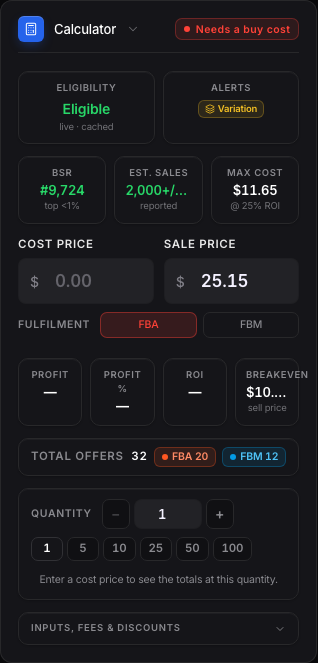
The quick-info tiles
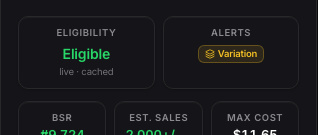
Across the top you'll see tiles for Max Cost, Margin, ROI, Breakeven, Est. Sales, and BSR. These update the moment you type a cost in. Max Cost tells you the most you could pay and still hit a healthy ROI. The ROI tile and the Breakeven tile both color themselves green, orange, or red depending on how the numbers actually hold up.
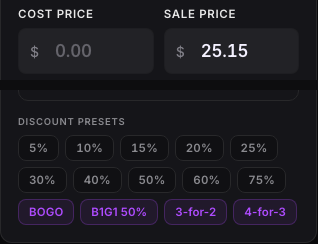
Entering your cost and sale price
Type your real buy cost into the Cost field. Sale price pulls from the listing automatically but you can override it. If the deal is a discount, there are presets for common percentages, plus named deals like BOGO, buy-one-get-one-50%-off, 3-for-2, and 4-for-3, so you don't have to do that math by hand.
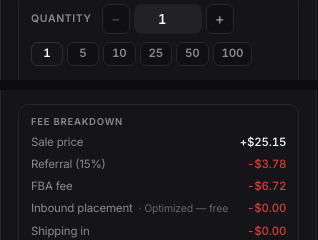
Quantity and the fee detail
Use the quantity presets, 1, 5, 10, 25, 50, or 100 units, to see your total profit at different order sizes. Click All filters to open the full fee ledger if you want to see storage cost, tax, and every fee broken out individually.
Want to use this tool on your own catalog?
See plans